

Not all of us familiar or heard the name of apache Solr (stands for Searching On Lucene w/ Replication).
Solr is an open-source enterprise-search platform, written in Java. Its major features include full-text search, hit highlighting, faceted search, real-time indexing, dynamic clustering, database integration, NoSQL features and rich document handling. Wikipedia
Installation Requirements
Supported Operating Systems
Solr is tested on several versions of Linux, macOS and Windows.
Java Requirements
You will need the Java Runtime Environment (JRE) version 11 or higher. At a command line, check your Java version like this:

Installing Solr
Available Solr Packages
Solr is available from the Solr website. Download the latest release https://solr.apache.org/downloads.html.
There are two separate packages:
solr-8.11.2.tgzthe binary package, for all operating systems.solr-8.11.2-src.tgzthe package Solr source code. This is useful if you want to develop on Solr without using the official Git repository.
Preparing for Installation
You can also download any version of Solr. I prefer the version 8x.
Package Installation
To keep things simple for now, extract the Solr distribution archive then go into the extracted directory, don't delete the archive file yet.

Final Command
sudo bash ./bin/install_solr_service.sh ../solr-8.11.2.tgz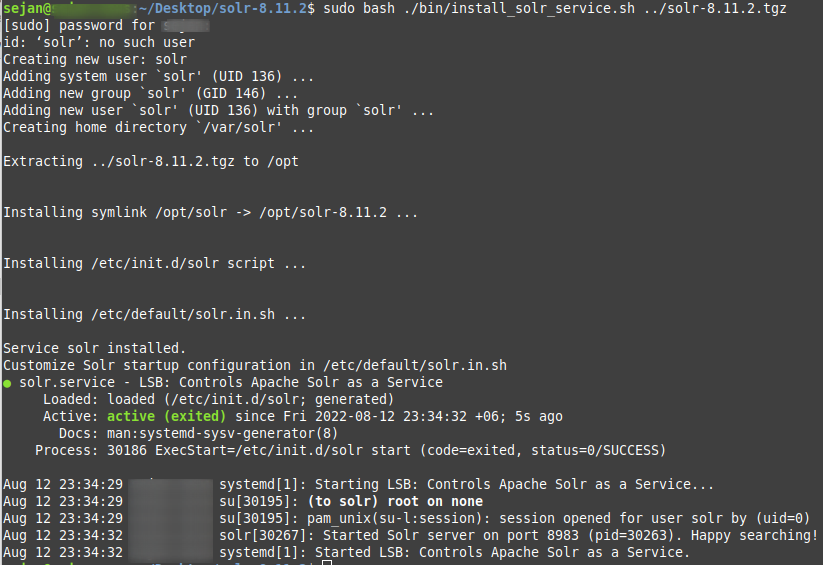
After the command executes successfully you'll be able to access solr admin UI from localhost:8983