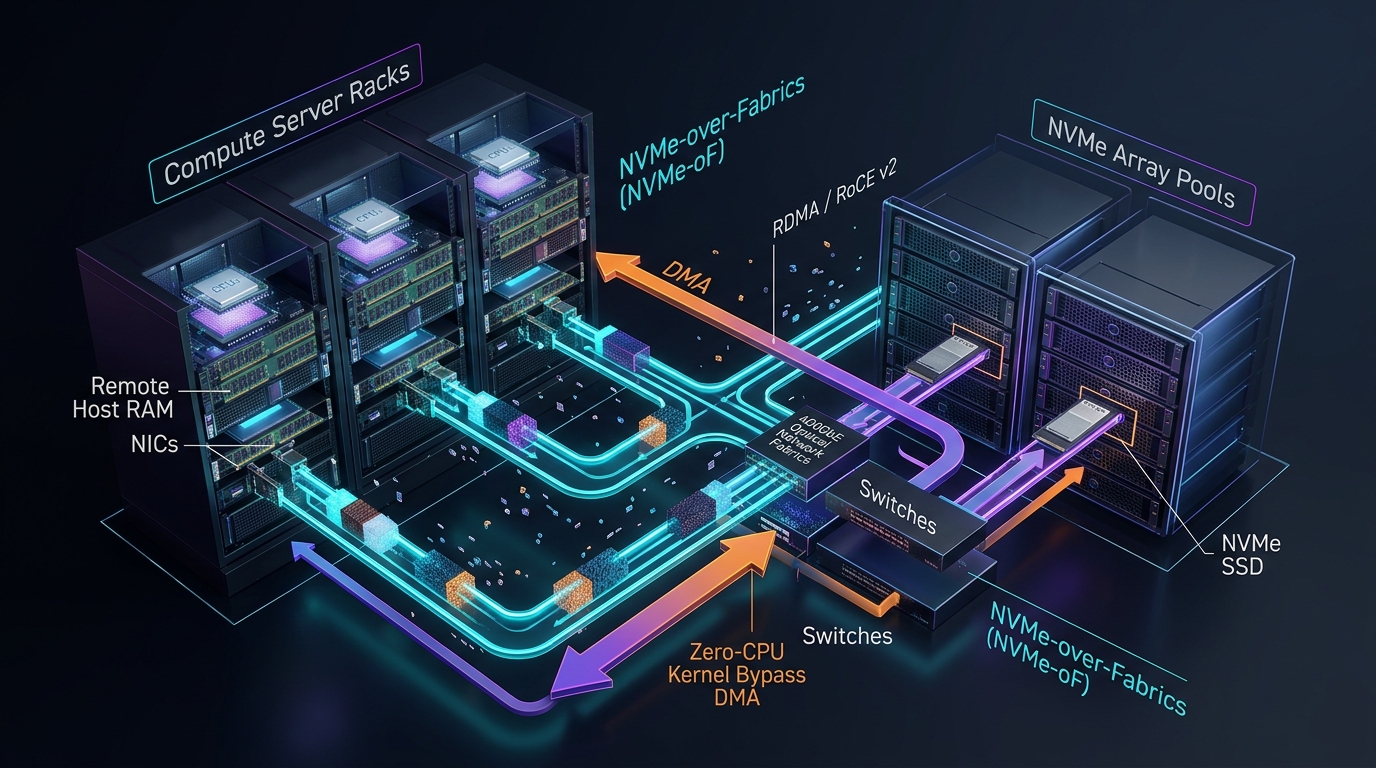
In traditional enterprise data centers, server architecture followed a rigid, monolithic pattern: Direct-Attached Storage (DAS). High-performance databases, analytical engines, and AI clusters crammed dozens of physical NVMe SSDs directly into the same PCIe chassis as the CPU and RAM.
While DAS delivers unmatched microsecond read latencies, it creates massive operational inefficiencies in hyperscale cloud environments. When a compute node needs to scale its CPU cores, its storage capacity remains stranded; when a database exhausts its disk space, expensive CPU and GPU cores sit underutilized. Furthermore, physical drive failures require invasive host maintenance, and live virtual machine migrations are nearly impossible.
The modern cloud infrastructure paradigm is Storage Disaggregation. By physically separating compute server racks from dedicated, centralized all-flash storage arrays over ultra-high-speed 100GbE / 400GbE / 800GbE optical network fabrics, cloud providers independently scale compute and storage on demand.
At the core of this disaggregation revolution is NVMe-over-Fabrics (NVMe-oF) paired with Remote Direct Memory Access (RDMA / RoCE v2). By bypassing the operating system kernel and CPU entirely, NVMe-oF enables remote SSD access with sub-10 microsecond latency—virtually indistinguishable from a local physical PCIe slot.
In this systems engineering guide, we dissect the internal mechanics of NVMe-oF, compare transport protocols (RDMA vs. TCP vs. Fibre Channel), analyze PCIe Gen 5 / CXL hardware scaling, examine SPDK (Storage Performance Development Kit), and demonstrate how to configure an NVMe-oF target and initiator on Linux.
The Evolution from iSCSI to NVMe-over-Fabrics
To appreciate why NVMe-oF represents a generational leap in storage performance, consider how legacy remote block storage (iSCSI / SAS) compares to the NVMe protocol:
| Dimension | Legacy iSCSI / SAS Storage | NVMe-over-Fabrics (NVMe-oF) |
|---|---|---|
| Command Protocol | Heavyweight SCSI command set (Designed in 1986 for spinning magnetic disks) | Streamlined NVMe command set (64 bytes fixed command format) |
| Queue Concurrency | Single shared queue (Max 32 to 256 commands depth) | Up to 64,000 independent queues (64k depth per queue!) |
| Core CPU Lock Contention | High: Multiple CPU cores serialize behind a single driver lock | Zero: Dedicated Submission/Completion queue per CPU core |
| Remote Network Added Latency | +100 to 250 microseconds ($\mu\text{s}$) | < 5 to 10 microseconds ($\mu\text{s}$) over RDMA |
The Magic of RDMA (RoCE v2): Zero-CPU Kernel Bypass
In standard network storage (like NFS or standard iSCSI over TCP), every 4KB read incurs severe CPU overhead: packet fragmentation, interrupt handling, copying bytes from NIC buffers into kernel memory, and copying again to user space.
Remote Direct Memory Access (RDMA)—specifically RoCE v2 (RDMA over Converged Ethernet)—allows the network adapter on Host A to write data directly into the physical RAM of Host B over standard Ethernet without involving the remote CPU or OS kernel:
Standard TCP Storage vs. RDMA Zero-Copy DMA:

Standard TCP Storage Path (High CPU Overhead):
[ NVMe SSD ] ──> Target Kernel ──> OS Socket Buffer ──> NIC ──(Network)──> Client NIC ──> Client Kernel ──> Client User App
                (Context Switch)   (Memory Copy)                                         (Context Switch)  (Memory Copy)

RDMA / RoCE v2 Storage Path (Zero-CPU Kernel Bypass):
[ NVMe SSD ] ──(Direct DMA)──> Target RDMA NIC ──(400GbE RoCE v2)──> Client RDMA NIC ──(Direct DMA)──> [ Client RAM ]
                (ZERO CPU INVOLVEMENT! Sub-8μs Wire-to-Memory Latency!)
Key Hardware Components of RDMA:
- Queue Pairs (QP): Every connection consists of a send queue and a receive queue mapped directly into the application's virtual address space.
- Completion Queues (CQ): Hardware-notified rings that signal when asynchronous DMA transfers are finished.
- PFC (Priority Flow Control) & ECN: Lossless Ethernet switching primitives that guarantee RoCE v2 packets are never dropped due to network buffer congestion.
NVMe-oF Transport Options: RDMA vs. TCP vs. FC
| Transport Layer | Network Infrastructure Required | Latency & Throughput Profile |
|---|---|---|
| NVMe/RDMA (RoCE v2 / InfiniBand) | RDMA-capable NICs (e.g. NVIDIA Mellanox ConnectX-6/7/8) + Lossless Ethernet switches | Fastest: Sub-8$\mu\text{s}$ latency, millions of IOPS, near-zero host CPU utilization. |
| NVMe/TCP | Standard commodity Ethernet NICs and standard IP switches (Zero special hardware) | Universal: ~15–25$\mu\text{s}$ latency; slight CPU overhead for TCP stack processing (mitigated with io_uring or TLS offload). |
| NVMe/FC (Fibre Channel) | Dedicated 32G / 64G Fibre Channel SAN switches and HBAs | Enterprise SAN compatibility; high hardware cost. |
SPDK: The Storage Performance Development Kit
While the Linux kernel has native NVMe-oF target and initiator drivers, extreme-performance applications (such as cloud hyperscaler hypervisors and AI storage pools) use SPDK (Storage Performance Development Kit).
SPDK runs entirely in User-Space, utilizing Poll-Mode Drivers (PMD) that communicate directly with PCIe NVMe controllers and RDMA NICs via UIO/VFIO, completely eliminating kernel system calls and thread interrupt latency.
Hands-On: Configuring a Native Linux NVMe-oF Target & Initiator
Below is a production-grade guide to exporting a high-speed NVMe namespace over TCP/RDMA using the native Linux kernel modules (nvmet and nvme):
1. Target Server Configuration (Storage Array Node)
# 1. Load kernel NVMe Target and Transport Modules
sudo modprobe nvmet
sudo modprobe nvmet-tcp # Or nvmet-rdma for RoCE v2

# 2. Create an NVMe Subsystem via configfs
sudo mkdir -p /sys/kernel/config/nvmet/subsystems/nqn.2026-09.dev.sejan:storage-pool-1
cd /sys/kernel/config/nvmet/subsystems/nqn.2026-09.dev.sejan:storage-pool-1

# Configure open access (or require DH-HMAC-CHAP authentication)
echo 1 | sudo tee attr_allow_any_host

# 3. Create and attach a Namespace pointing to physical NVMe drive (/dev/nvme0n1)
sudo mkdir -p namespaces/1
cd namespaces/1
echo -n "/dev/nvme0n1" | sudo tee device_path
echo 1 | sudo tee enable

# 4. Bind the subsystem to an Ethernet/RDMA Port on Port 4420
sudo mkdir -p /sys/kernel/config/nvmet/ports/1
cd /sys/kernel/config/nvmet/ports/1
echo "192.168.10.50" | sudo tee addr_traddr
echo "tcp"            | sudo tee addr_trtype # Use 'rdma' for RoCE v2
echo "4420"           | sudo tee addr_trsvcid
echo "ipv4"           | sudo tee addr_adrfam

# Link subsystem to the listening network port
sudo ln -s /sys/kernel/config/nvmet/subsystems/nqn.2026-09.dev.sejan:storage-pool-1 \
  /sys/kernel/config/nvmet/ports/1/subsystems/nqn.2026-09.dev.sejan:storage-pool-1

echo "[NVMe-oF Target] Successfully exported /dev/nvme0n1 over 192.168.10.50:4420!"
2. Initiator Configuration (Compute Node Client)
# 1. Load NVMe-oF Initiator client module
sudo modprobe nvme-tcp # Or nvme-rdma

# 2. Discover available remote NVMe targets on the network fabric
sudo nvme discover -t tcp -a 192.168.10.50 -s 4420

# 3. Connect to the remote NVMe subsystem
sudo nvme connect -t tcp \
  -n "nqn.2026-09.dev.sejan:storage-pool-1" \
  -a 192.168.10.50 \
  -s 4420

# 4. Verify remote drive is attached as a local block device!
lsblk | grep nvme
# Output: nvme1n1   2.0T  disk (Remote block device behaving like local PCIe SSD!)

# 5. Benchmark latency with fio
sudo fio --name=read_latency --filename=/dev/nvme1n1 --direct=1 \
  --rw=randread --bs=4k --ioengine=io_uring --iodepth=1 --runtime=10 --time_based
Summary & Engineering Checklist
- Disaggregate for Cloud Efficiency: Decouple compute and storage nodes to eliminate stranded capacity and enable independent horizontal scaling.
- Standardize on NVMe-over-Fabrics: Replace legacy iSCSI protocols with NVMe-oF to unlock multi-core queue concurrency (64k queues) and eliminate driver lock serialization.
- Deploy RoCE v2 for Latency-Critical Workloads: Leverage RDMA zero-copy kernel bypass for AI training clusters, distributed transactional databases (TiKV, Spanner), and financial systems requiring $< 10\mu\text{s}$ remote I/O.
- Use NVMe/TCP for Standard Deployments: If specialized RDMA switching is cost-prohibitive, NVMe/TCP delivers $> 80\%$ of the benefits over standard commodity Ethernet infrastructure.