
DNS cache is a temporary database that stores information about previous DNS lookups. In other words, whenever you visit a website, your OS and web browser will keep a record for the domain and the corresponding IP address. This eliminates the need for repetitive queries to the remote DNS servers and allows your OS or browser to resolve the website’s URL quickly.
However, in some situations like troubleshooting network issues or after changing DNS resolvers, you will need to flush the DNS cache. This will clear the cached DNS entries and perform a subsequent lookup to resolve the domain based on newly configured DNS settings.
This guide provides instructions on how to flush the DNS cache on different operating systems and web browsers.
Clear/Flush DNS Cache on Windows
The process of clearing the DNS cache is the same for all Windows versions. You need to open the command prompt with administrator privileges and runipconfig /flushdns.
- Type cmd in the Windows search bar.
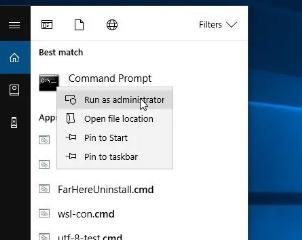 3. On the command line, type the following line and press Enter
ipconfig /flushdns4. Additionally you can run
ipconfig /release followed by ipconfig /renew
Clear/Flush DNS Cache on Linux
Most modern Linux distributions such as Ubuntu 18.04 are using systemd resolved service to cache DNS entries. To find out whether the service is running use the following command:Copy If the service is running, the command will print active. Otherwise, you will see inactive. To clear the Systemd Resolved DNS cache, type:sudo systemctl is-active systemd-resolved.service
Copy On success, the command doesn’t return any message.sudo systemd-resolve --flush-caches
