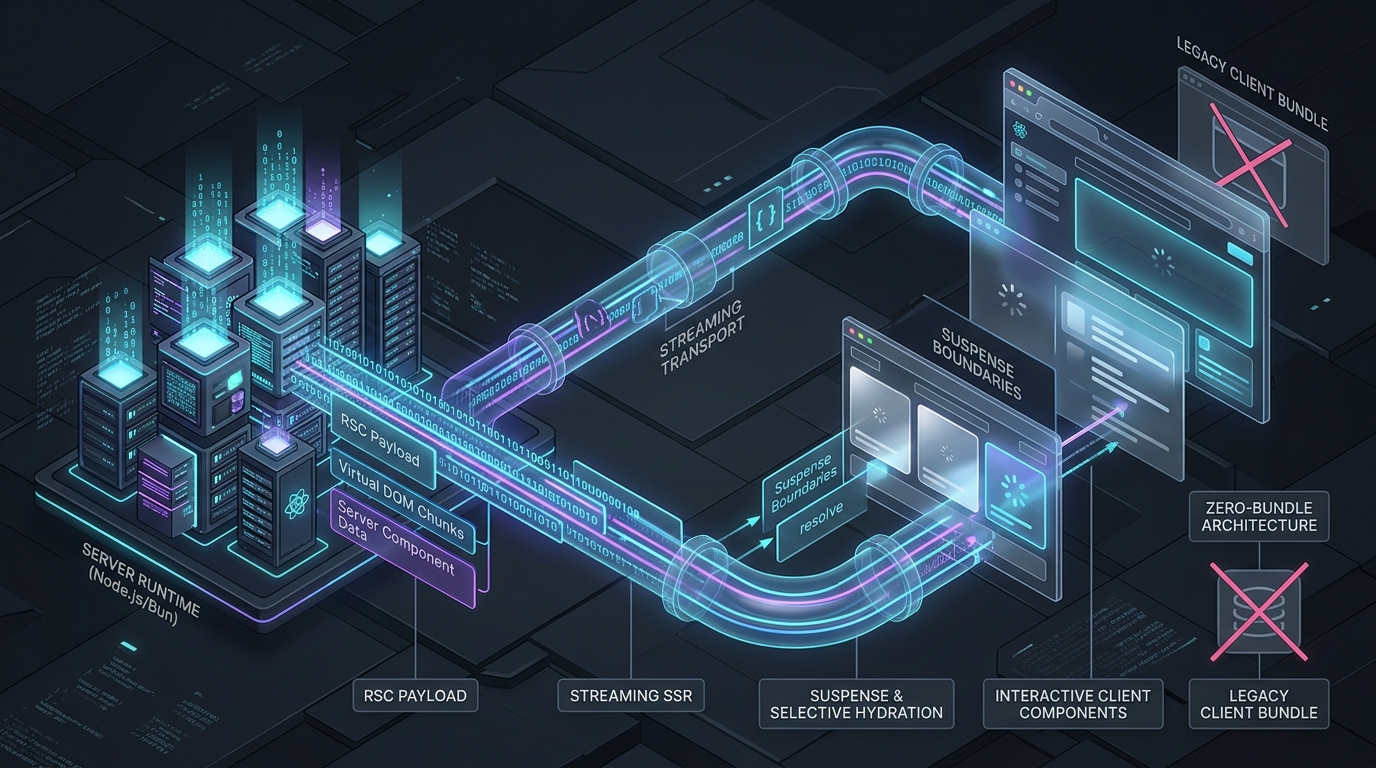
For over a decade, frontend web architecture oscillated between two extremes: pure Client-Side Rendering (CSR) single-page applications burdened with massive JavaScript bundle payloads, and traditional Server-Side Rendering (SSR) frameworks that shipped fast first HTML paints but suffered from punishing hydration waterfalls and double-data transmission penalties.
React Server Components (RSC) and Streaming Server-Side Rendering (SSR) represent the most significant fundamental shift in frontend systems engineering since the introduction of the virtual DOM in 2013. Rather than choosing between server rendering and client interactivity, RSC partitions component execution across the network boundary, delivering true zero-bundle-size server components while preserving rich, instantaneous client-side UI interactivity.
Yet, despite widespread adoption via modern frameworks like Next.js App Router and Vite-based server setups, the internal mechanical plumbing of RSC remains widely misunderstood. How does the server serialize dynamic component trees without shipping raw HTML? What actually travels across the network in the React Flight wire protocol? How does progressive hydration resolve Suspense boundaries out-of-order over chunked HTTP transfer streams?
In this architectural deep dive, we dissect the execution mechanics, protocol specifications, streaming pipelines, and tradeoffs behind modern React Server Components.
The Evolution of Frontend Rendering Architectures
To appreciate why React Server Components were designed this way, we must examine the physical bottlenecks of prior architectures:
flowchart TD
    subgraph CSR["Traditional CSR (SPA)"]
        C1["Empty HTML Shell (<div id='root'>)"] --> C2["Download Entire App Bundle (1-5MB JS)"]
        C2 --> C3["Parse, Compile & Execute JavaScript"]
        C3 --> C4["Fetch Data via Client API Calls"]
        C4 --> C5["Paint UI & Interactive (High TTI & FCP)"]
    end

    subgraph SSR["Classic SSR (SSR + Full Hydration)"]
        S1["Server Renders Static HTML Tree"] --> S2["Browser Paints Initial HTML (Fast FCP)"]
        S2 --> S3["Download Entire Client Bundle + JSON Payload"]
        S3 --> S4["Full Hydration (Re-runs full tree on client)"]
        S4 --> S5["UI Finally Becomes Interactive (Hydration Uncanny Valley)"]
    end

    subgraph RSC["React Server Components + Streaming SSR"]
        R1["Server Streams HTML Shell Immediately"] --> R2["Browser Paints Shell + Fallback Skeletons"]
        R1 -.->|HTTP Chunked Stream| R3["Server Streams Flight Protocol Chunks"]
        R3 --> R4["Zero JS Bundle for Server Tree Components"]
        R4 --> R5["Progressive Selective Hydration (Only Client Leaves)"]
    end

    style CSR fill:#1e293b,stroke:#475569,color:#fff
    style SSR fill:#334155,stroke:#64748b,color:#fff
    style RSC fill:#0f172a,stroke:#0284c7,color:#fff
The Two Structural Flaws of Classic SSR:
- The Double-Data Cost: In traditional SSR, data fetched on the server must be included twice: once inside the server-rendered HTML markup, and once as a serialized JSON script block (e.g.,
window.__INITIAL_DATA__) so the client JavaScript can reconstruct the initial state during hydration. - The Hydration Uncanny Valley: Users see a fully painted button or search bar, but clicking it produces zero response because the main thread is locked downloading and compiling megabytes of JavaScript required to attach event listeners across the entire DOM tree.
The RSC Mental Model: Server vs. Client Components
React Server Components introduce a strict separation between components based on where they execute and what they can import:
| Property / Capability | Server Component (Default) | Client Component ('use client') |
|---|---|---|
| Execution Environment | Server-only (Node.js, Deno, Bun, Cloudflare Workers) | Both: Server during SSR (HTML pass) + Browser (DOM) |
| Client JS Bundle Impact | 0 KB (Zero bundle footprint) | Included in client bundle package |
| Access to Direct DB / Filesystem | Yes (Direct SQL, ORM, filesystem, private env vars) | No (Must query via REST, GraphQL, or Server Actions) |
| React Hooks & Interactivity | No (Cannot use useState, useEffect, event listeners) |
Yes (Full React hook lifecycle and browser events) |
| Re-rendering Lifecycle | Re-rendered on server when navigation / action occurs | Re-rendered on client when state or props change |
The boundary between Server and Client is explicitly marked with the 'use client' directive. Crucially, 'use client' does not mean "this component executes only on the client"; it defines a boundary marker signaling that this component and its descendants must be packaged into the client bundle and hydrated into the interactive DOM tree.
Dissecting the React Flight Wire Protocol
When a server renders a Server Component tree, it does not produce raw HTML strings. If it produced raw HTML, subsequent client-side navigations would cause browser-level DOM replacements, wiping away existing client state (such as focused inputs, scroll positions, and active animations).
Instead, the server emits a specialized streaming binary-text serialization protocol code-named React Flight.
sequenceDiagram
    autonumber
    participant Browser as Browser Client
    participant Server as RSC Server Runtime
    participant DB as Database / Microservice

    Browser->>Server: HTTP GET /posts/my-slug (Accept: text/x-component)
    Server->>DB: Query post markdown & author metadata
    DB-->>Server: Return raw record
    Note over Server: Server renders Markdown to VDOM nodes.
Heaviest markdown parsers (marked/shiki)
never leave the server!
    Server-->>Browser: Stream Flight Row: 1:I["./Avatar.client.js",["Avatar"]]
    Server-->>Browser: Stream Flight Row: 2:{"slug":"my-slug","author":"$1"}
    Server-->>Browser: Stream Flight Row: 0:["$","article",null,{...}]
    Note over Browser: Client parses Flight stream chunks,
loads Avatar.client.js asynchronously,
and reconciles VDOM without reloading page!
The Format of a Flight Chunk
Each line in a React Flight stream consists of an identifier, a type code, and serialized payload:
ID:TYPE[PAYLOAD...]
Let's inspect an actual live Flight chunk produced by a modern React 19 / Next.js server:
M1:{"id":"./src/components/Counter.client.js","chunks":["client-counter.js"],"name":"Counter","async":false}
J0:["$","div",null,{"className":"container","children":[["$","h1",null,{"children":"Server Post Title"}],["$","$L1",null,{"initialCount":0}]]}]
Decoding the Chunk Tokens:
M1:...(Module Reference): Informs the client: "Chunk ID 1 represents a Client Component defined at./src/components/Counter.client.js". The client bundle runtime uses this reference to look up the component in its Webpack/Turbopack manifest.J0:...(JSON React Element Tree): Represents the rendered virtual DOM tree with ID 0. Notice the structure:["$", "div", null, {...}]matches the classic React element shape:React.createElement(type, key, props).["$", "$L1", null, {"initialCount": 0}]: The symbol$L1is a Lazy Reference pointing to Client Component Module 1! The server passes props (initialCount: 0) to the client component without having to execute the client component's body.
S...(Suspense Boundaries & Promises): When an asynchronous Server Component awaits a slow promise, the server outputs a Suspense boundary with a placeholder ID, flushes the shell immediately, and later emits the resolved payload on that ID once the promise fulfills.
Streaming SSR: renderToPipeableStream and Chunked Transfer
How do the Flight protocol and initial HTML work together on the initial page load? React provides the modern server streaming API: renderToPipeableStream (Node.js Streams) or renderToReadableStream (Web Streams API).
During the initial HTTP request, the server executes a dual streaming pipeline:
- The HTML Stream: The server streams the initial HTML shell containing fast components and Suspense skeleton fallbacks. The browser immediately parses and displays this markup.
- Inlined Flight Data: As delayed server components finish resolving in the background, the server emits subsequent HTML chunks containing hidden
<template>tags and small inline<script>blocks that inject the matching Flight data directly into the client React runtime.
<!-- Initial Stream Chunk: Shell + Skeleton -->
<div class="post-layout">
  <h1>Architectural Guide to RSC</h1>
  <!-- Suspense Boundary Marker -->
  <!--$?-->
  <template id="B:0"></template>
  <div class="skeleton">Loading comments...</div>
  <!--/$-->
</div>

<!-- Later Stream Chunk: Comments resolved after 250ms -->
<div hidden id="S:0">
  <div class="comments-list">
    <p>First comment by Alice</p>
    <p>Second comment by Bob</p>
  </div>
</div>
<script>
  $RC("B:0", "S:0"); // React Client runtime swaps placeholder B:0 with real markup S:0
</script>
Because this pipeline uses standard HTTP/1.1 chunked transfer encoding (or HTTP/2 / HTTP/3 data frames), the connection remains open. The browser starts rendering in tens of milliseconds, even if heavy database queries or LLM inference calls on the server take multiple seconds to resolve.
Progressive Selective Hydration
In traditional React, hydration was an atomic, all-or-nothing operation: React traversed the entire DOM tree from <html> to leaf nodes, attaching event handlers. If a single deep component threw an error or loaded slowly, the entire page remained non-functional.
With React Server Components and Suspense streaming, React executes Progressive Selective Hydration:
flowchart LR
    subgraph Stream["Server Chunks Over HTTP"]
        C1["Shell HTML (Header, Nav)"] --> C2["Main Body (Server Component)"]
        C2 --> C3["Comments (Suspended Client Component)"]
    end

    subgraph Hydration["Browser Client Progressive Hydration"]
        H1["1. Nav Hydrates (Instant Interactive)"]
        H2["2. Main Body: Zero Hydration (Pure HTML/Flight)"]
        H3["3. User clicks Comments placeholder? Priority elevated!"]
        H4["4. Comments Component Hydrated Selectively"]
    end

    C1 --> H1
    C2 --> H2
    C3 --> H3
    H3 --> H4

    style Stream fill:#1e293b,stroke:#475569,color:#fff
    style Hydration fill:#0f172a,stroke:#38bdf8,color:#fff
Key superpowers of Selective Hydration:
- Zero Work for Server Leaves: Server Components are never hydrated. The browser never runs code to reconcile them; they remain pure DOM elements.
- User-Driven Priority Inversion: If the user clicks on a suspended component before its JavaScript bundle has finished hydrating, React intercepts the native click event, bumps that specific component to highest priority, hydrates it immediately, and replays the user's click event seamlessly!
Building a Minimal Server Component Runtime in Node.js
To demystify how this operates without framework magic, let's look at how React 19's server APIs can be orchestrated in a raw Node.js HTTP server:
// server.js: Minimal RSC + Streaming SSR Pipeline
import http from 'node:http';
import React from 'react';
import { renderToPipeableStream } from 'react-server-dom-webpack/server.node';
import App from './src/App.server.js';

const server = http.createServer(async (req, res) => {
  const url = new URL(req.url, `http://${req.headers.host}`);

  // 1. If client requests raw Flight stream (client-side navigation)
  if (url.searchParams.has('_rsc')) {
    res.setHeader('Content-Type', 'text/x-component; charset=utf-8');
    const { pipe } = renderToPipeableStream(
      React.createElement(App, { path: url.pathname }),
      // Client module manifest mapping client components to bundle chunks
      moduleManifest
    );
    pipe(res);
    return;
  }

  // 2. Initial Page Load: Stream dual HTML + embedded Flight payload
  res.setHeader('Content-Type', 'text/html; charset=utf-8');
  res.setHeader('Transfer-Encoding', 'chunked');

  res.write('<!DOCTYPE html><html><head><title>RSC Demo</title></head><body><div id="root">');

  const { pipe } = renderToPipeableStream(
    React.createElement(App, { path: url.pathname }),
    moduleManifest,
    {
      onShellReady() {
        // Stream the rendered HTML shell
        pipe(res);
      },
      onAllReady() {
        res.write('</div><script src="/client-bundle.js"></script></body></html>');
        res.end();
      },
      onError(err) {
        console.error('Streaming SSR Error:', err);
      }
    }
  );
});

server.listen(3000, () => {
  console.log('RSC Server streaming on http://localhost:3000');
});
And here is the corresponding App.server.js utilizing direct async database queries without client bundle leakage:
// src/App.server.js: Async Server Component
import React, { Suspense } from 'react';
import { db } from './db.js';
import InteractiveCounter from './InteractiveCounter.client.js';

// Server-only data fetcher
async function SlowMetrics() {
  const metrics = await db.query('SELECT total_users, active_sessions FROM analytics');
  return (
    <div className="metrics-box">
      <p>Active Sessions: {metrics.active_sessions}</p>
      <p>Total Users: {metrics.total_users}</p>
    </div>
  );
}

export default async function App({ path }) {
  const post = await db.query('SELECT title, content FROM posts WHERE slug = ?', [path]);

  return (
    <main className="article-container">
      <h1>{post.title}</h1>
      <article>{post.content}</article>

      {/* Interactive Client Leaf: only this ships JS to the browser */}
      <InteractiveCounter initialLikes={10} />

      {/* Asynchronous Server Component streamed in background */}
      <Suspense fallback={<div className="skeleton">Loading live metrics...</div>}>
        <SlowMetrics />
      </Suspense>
    </main>
  );
}
Architectural Comparison: RSC vs. Astro Islands vs. HTMX vs. Inertia.js
RSC is not the only modern response to SPA bloat. How does it compare to other leading architectural paradigms in 2026?
| Dimension | React Server Components | Astro Islands | HTMX | Inertia.js |
|---|---|---|---|---|
| Primary Output | Flight Stream (VDOM Nodes) + Streaming HTML | Static HTML + Isolated Client Islands | Hypermedia (Raw HTML fragments) | JSON Props into Client SPA Components |
| Client State on Navigation | Preserved (VDOM reconciliation) | Lost on page reload (unless view transitions used) | Replaced per targeted DOM element | Preserved (Full SPA router) |
| Client JS Runtime Size | Medium (React DOM client runtime ~45KB + client leaves) | Near Zero (0-5KB unless islands added) | Ultra Low (~14KB htmx.min.js) | High (Full client framework bundle) |
| Best Suited For | Complex, highly interactive web apps with mixed server data | Content-heavy sites, documentation, marketing portfolios | CRUD enterprise dashboards, classic monoliths (Django/Laravel) | Monolithic fullstack apps desiring SPA UX without REST APIs |
Common Anti-Patterns and Production Traps
1. "Poisoning" the Tree with Premature 'use client'
Because 'use client' marks a component and all its transitive imports as client code, placing 'use client' at the top of a layout or container file immediately forces all child components—and their imported NPM packages—into the client bundle! Rule: Push 'use client' as far down the component tree as possible (to buttons, input bars, interactive toggles).
2. The Serialization Boundary Trap
Props passed from a Server Component to a Client Component must be serializable by the Flight protocol. Passing non-serializable objects (such as function callbacks, JavaScript classes with prototypes, or database client instances) triggers an immediate serialization error:
Error: Functions cannot be passed directly to Client Components unless you explicitly expose a Server Action.
3. Accidental Sequential Fetching Waterfalls
Because async Server Components await promises directly in their execution context, sequential calls can quickly reintroduce server-side latency waterfalls:
// ❌ ANTI-PATTERN: Sequential server waterfall (takes 100ms + 150ms = 250ms)
const user = await getUser(userId);
const orders = await getOrders(user.id);

// ✅ BEST PRACTICE: Parallel execution when dependencies permit
const [user, catalog] = await Promise.all([getUser(userId), getCatalog()]);
Conclusion
React Server Components are not merely an optimization trick—they fundamentally redefine the relationship between the server and the browser. By leveraging the React Flight wire protocol, chunked HTTP streaming, and progressive selective hydration, modern web applications can achieve near-instantaneous Time to First Contentful Paint without sacrificing client-side state or bloating browser bundles.
Understanding these wire-level mechanics demystifies framework abstractions and equips software engineers to build high-performance, resilient web architectures that scale effortlessly under real-world production demands.