 React-Bootstrap replaces the Bootstrap JavaScript. Each component has been built from scratch as a true React component, without unneeded dependencies like jQuery.
As one of the oldest React libraries, React-Bootstrap has evolved and grown alongside React, making it an excellent choice as your UI foundation.
Built with compatibility in mind, we embrace our bootstrap core and strive to be compatible with the world’s largest UI ecosystem.
In react-bootstrap responsive layout after opening the menu by clicking the hamburger icon we get the list of menu links. when clicking on any of them react links tends to render the page component but the navbar stays still open which is pretty annoying. Lets find a quick workaround to solve this.
to the root
React-Bootstrap replaces the Bootstrap JavaScript. Each component has been built from scratch as a true React component, without unneeded dependencies like jQuery.
As one of the oldest React libraries, React-Bootstrap has evolved and grown alongside React, making it an excellent choice as your UI foundation.
Built with compatibility in mind, we embrace our bootstrap core and strive to be compatible with the world’s largest UI ecosystem.
In react-bootstrap responsive layout after opening the menu by clicking the hamburger icon we get the list of menu links. when clicking on any of them react links tends to render the page component but the navbar stays still open which is pretty annoying. Lets find a quick workaround to solve this.
to the root 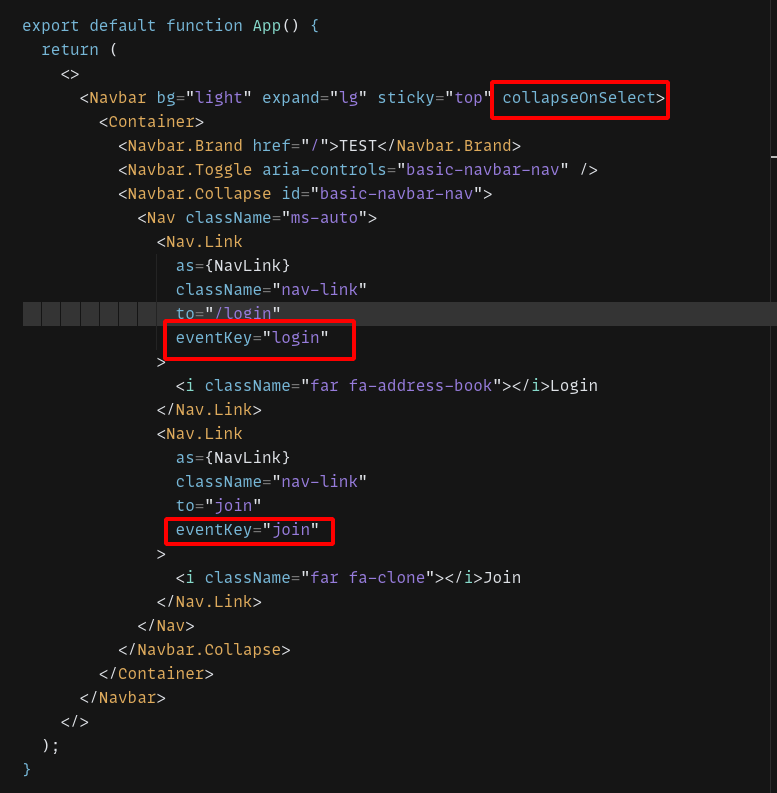 Here is the demo codesandbox link for you to see it work.
make sure it is on collapsed mode to start
Here is the demo codesandbox link for you to see it work.
make sure it is on collapsed mode to start


